Built for invisible chronic illness

Track your days. Show the pattern. Walk in with proof.

Zebra is an iPhone symptom tracker for POTS, dysautonomia, EDS, Fibromyalgia, and overlapping conditions. It keeps symptoms, orthostatic vitals, medications, salt, water, and notes in one record so you can export a doctor-ready report instead of rebuilding everything before an appointment.

What it is
An iPhone symptom tracker that turns patient-entered history into a doctor-ready report.
Who it is for
People managing POTS, dysautonomia, EDS, Fibromyalgia, and overlapping chronic illness.
Why it is different
It keeps daily symptoms, orthostatic vitals, meds, salt, water, and notes in one appointment-ready record.

Track free. Export the doctor report with Premium. Your data stays on your device and iCloud. Not medical advice or diagnosis.

  • Built for brain fog
  • Made for specialist appointments
  • Not a generic wellness tracker
Daily check-in Track in under 60 seconds
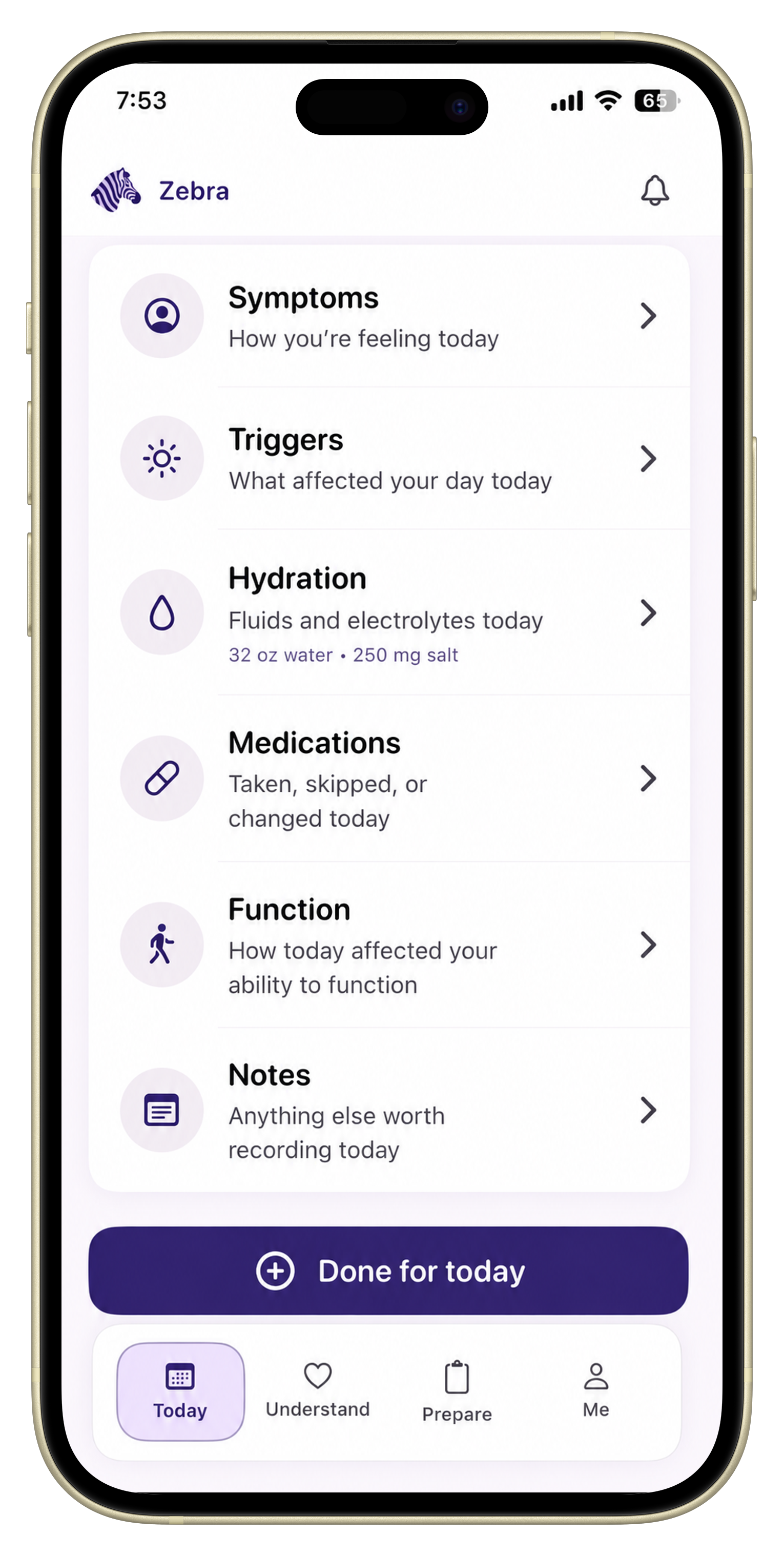
Zebra iPhone symptom tracker check-in for POTS, dysautonomia, EDS, and Fibromyalgia showing symptoms, triggers, hydration, medications, function, and notes in one record.

The real problem

Your history should not live in memory.

Zebra keeps the month together so the appointment does not start with guesswork.

Recognize the problem

You are already tracking. It just is not usable when it matters.

What the month feels like

Notes Screenshots Memory Zebra

Notes, screenshots, and half-finished apps do not become a clear symptom history by themselves.

When the doctor asks what changed, brain fog and scattered data make even a real pattern hard to explain.

  • Too many places to look
  • Too much to remember
  • Nothing clean to hand over
"I have data everywhere."
"I forgot by the appointment."
"Nothing shows the full picture."

Doctor-report proof

The doctor report is the payoff.

Zebra turns your tracked days into one clear doctor-ready report built for specialist appointments.

30-day history Patterns Doctor-ready PDF Appointment

Instead of retelling the month from memory, you can show a dated record of what happened, how often, and what changed.

The report is built from patient-entered symptoms, orthostatic vitals, medications, salt, water, notes, and functional impact so the appointment can start from a cleaner shared picture.

  • 30-day symptom history, flares, meds, and triggers together
  • Salt, water, and orthostatic vitals in the same timeline
  • Questions and changes worth discussing before the visit
  • Clean enough to review quickly in an appointment
  • Careful in its claims and not a diagnostic tool

Why people keep tracking

The whole page builds to this moment

Daily logs become something useful only when they help you prepare, explain, and hand over a clearer record a specialist can review quickly.

Before Zebra

Rebuild the month from memory

  • Open Notes
  • Search screenshots
  • Hope you do not forget the important part

With Zebra

Walk in with the record already made

  • Review the timeline
  • Export the doctor report
  • Spend the visit talking, not reconstructing
Download on the App Store

Start free now. Upgrade only when you want to export the report.

Doctor report preview Consultation brief preview
Zebra doctor-ready report and appointment preparation screen showing changed symptoms, a consultation brief preview, and patient-entered history for a specialist visit.

How Zebra works

Three short steps from symptom to report.

Zebra keeps the flow simple on bad days and useful later.

TodayThis weekBefore the appointment
  1. 01

    Track today

    Log symptoms, flares, meds, salt, water, and notes in one quick check-in.

  2. 02

    Capture context

    Add orthostatic vitals when needed so numbers stay connected to the rest of the day.

  3. 03

    Export the pattern

    When the appointment gets close, your history is already ready for a doctor report.

Daily tracking

What can I track without extra effort?

The check-in is short, familiar, and built for low-energy days.

You open Zebra, log what matters, and move on. No blank setup. No wellness homework.

What happens in under a minute

Open ZebraTap what changedReturn to your day
  • Flares and symptoms
  • Meds and notes
  • Salt, water, and triggers

Why it feels lighter

Condition-aware from the start

You do not have to invent the structure first.

Why it matters later

Everything lands in one timeline

That is what makes the doctor report possible.

Start tracking on iPhone

One calm place for the daily record.

Daily check-in Symptoms, triggers, hydration, meds
Zebra iPhone symptom tracker check-in for POTS, dysautonomia, EDS, and Fibromyalgia showing symptoms, triggers, hydration, medications, function, and notes in one record.

Orthostatic test

Where do my vitals fit?

They stay in the same record as everything else.

Zebra keeps lying, sitting, and standing vitals connected to your symptoms instead of splitting them into another tool.

The guided sequence

Lie downSit upStandSave to the same timeline
  • Guided lying, sitting, standing flow
  • Same timeline as symptoms and meds
  • Easier to review later with context

Why that helps

Your numbers are not isolated

Doctors can see them beside the rest of the day.

Why it matters

Less juggling, more clarity

You are not bouncing between multiple health tools.

See how the report comes together

Vitals stay useful because they stay connected.

Evidence capture Orthostatic test inside the report flow
Zebra appointment preparation screen showing orthostatic test evidence, medication timeline details, and questions to ask before an appointment.

Trust

Why should I trust this with my health story?

Because Zebra stays private, careful, and focused on the real appointment problem instead of making bigger claims than it can support.

Trust at a glance

Private by design. Built for brain fog. Careful in its claims.

Zebra is designed to help you keep a clearer record for specialist appointments, not to diagnose you, treat you, or sell your health data.

The end state

More prepared. Less overwhelmed.

The goal is not to make illness feel tidy. It is to help the appointment feel calmer because your record is already there.

Privacy-first

Your data stays on your iPhone and private iCloud account.

You own the record

No account, no health-data server, and no rebuilding your history in someone else’s system.

Brain-fog-friendly

Short flows, clear hierarchy, low-energy use.

Specialist focused

Built around appointments, not self-optimization or wellness streaks.

Medically careful

No diagnosis, no treatment advice, and no overclaiming about what your data means.

Patient-entered data

What Zebra summarizes comes from the history you track and review yourself.

Who Zebra is for

Is this built for me?

Yes, if your symptoms overlap and appointments are hard to summarize.

  • POTS
  • Dysautonomia
  • EDS / hEDS
  • Long COVID
  • Fibromyalgia
  • ME/CFS
  • Overlapping conditions
  • Brain fog and low-energy days

Zebra is for people who need a clearer record, not a generic wellness dashboard.

FAQ

Questions about Zebra.

What is Zebra symptom tracker?

Zebra is an iPhone symptom tracker for POTS, dysautonomia, EDS, Fibromyalgia, and overlapping chronic illness. It turns patient-entered symptom history into a doctor-ready report for appointments.

Who is Zebra for?

It is built for people managing POTS, dysautonomia, EDS, Fibromyalgia, Long COVID, ME/CFS, and overlapping symptoms that are hard to explain in appointments.

What does Zebra track?

Flares, symptoms, medications, triggers, salt, water, function, notes, and orthostatic vitals all stay in one timeline.

How is Zebra different from a generic symptom tracker app?

You do not start from a blank template. Zebra is built for chronic illness check-ins, low-energy use, orthostatic tracking, and the doctor report as the payoff instead of making you rebuild everything in Notes.

How does Zebra help with appointment preparation?

Zebra keeps patient-entered symptom history, orthostatic vitals, medications, and notes in one place so you can review what changed and export a doctor-ready report before a specialist visit.

Where is Zebra data stored?

Your data stays on your iPhone and iCloud. Zebra does not require an account or run a health-data server.

Does Zebra diagnose or treat anything?

No. Zebra does not diagnose, treat, or provide medical advice. It helps you organize your history for care conversations.

What does Premium include?

Premium unlocks doctor report export, unlimited history, and the full orthostatic archive. The free tier includes core tracking and 30 days of history.

How do I get Zebra support?

Use the Zebra support page or email riznewhite@gmail.com if you need help with the app, billing, or privacy questions.

Download Zebra

Start tracking before the next appointment asks you to remember everything.

Begin with the free tracker today. Upgrade only when you want the doctor report and deeper history.

Track daily See the pattern Export the report

A calmer appointment starts with a record you do not have to rebuild.

Download on the App Store

Track free. Doctor report export with Premium. Your data stays on your device. Not medical advice.